


Is CnvMP3 safe?
Based on my latest tests, CnvMP3 is relatively safe to use. There were no obvious ads, pop-ups, third-party redirects, malware, misleading download buttons, or unexpected installers observed.
CnvMP3 is an online YouTube converter known for its simple, donation-supported, and mostly ad-free experience. But is CnvMP3 still safe and working in 2026? In this hands-on review, I retested CnvMP3 to check its ads, redirects, download safety, conversion performance and limits, audio quality, common issues and fixes, and reliable alternatives when CnvMP3 is not working.
In my latest test, the official CnvMP3 domain appeared more stable than many similar YouTube conversion services. The domain I tested seemed to be the active official site rather than a fake or mirror site, which may reduce some risks caused by frequent domain changes, clone sites, or suspicious redirects.
The official CnvMP3 website showed no visible ads, malicious redirects, fake download buttons, or unexpected installers during this test. The downloaded files were also the expected .mp3 and .mp4 files, and they produced no malware detections in my scan.
Based on these results, CnvMP3 can be considered relatively safe for one-off downloads at the time of testing. However, this does not mean it is permanently safe. Online converter sites can change their domains, scripts, ads, or download behavior without notice, so you should always verify the exact domain and check the downloaded file.
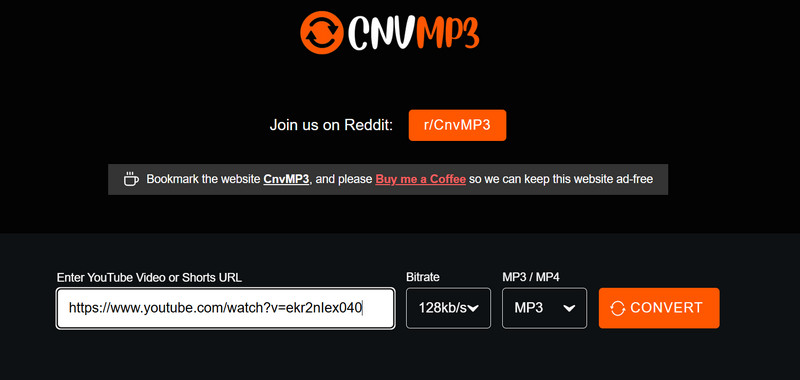
Here is a quick summary of what I found in my latest hands-on test.
| Test Item | Latest Result | What It Means |
| Exact Domain | https://cnvmp3.com/ | Stable main domain, with occasional link redirects |
| Ads and pop-ups | None observed | Cleaner and ad-free experience during this test |
| Third-party redirects | None observed | No unrelated tabs opened during testing |
| URL malware scan | Mostly clean | 1 suspicious flag |
| Downloaded-file scan | Passed | No threat was detected in the downloaded files I tested |
| Short MP3 conversion (3 ~ 5m) | Passed | Works well for short videos |
| Standard MP3 conversion (30m) | Passed | Suitable for one-off MP3 conversions |
| Long MP3 conversion (> 1.5h) | Failed | MP3 conversion failed for videos longer than 1.5h |
| Long MP4 conversion (> 1h) | Failed | MP4 conversion failed for videos longer than 1h |
| 320 kbps MP3 | Supported | Output depends on the source audio quality and cannot exceed source detail |
| HD and 4K MP4 | 1080p passed; no 4K output | HD output worked, but 4K output was not supported |
| Playlist and batch | Not supported | Does not parse playlist URLs or support batch downloads |
CnvMP3 is ideal for casual users for short, one-off downloads, but not for heavy users who have high-volume downloads. If you need to download playlists, multiple URLs at once, or long-form videos, try Any Video Converter instead.
Based on my latest tests, CnvMP3 is relatively safe to use. There were no obvious ads, pop-ups, third-party redirects, malware, misleading download buttons, or unexpected installers observed.
This depends on how you use it and what kind of content you're going to download. Downloading copyrighted and unauthorized content may violate the Terms of Use of the original platforms. Only download content you own, public-domain content, or content you have permission to download.
Currently, the main CnvMP3 domain remains https://cnvmp3.com/. However, the actual landing URL may change or redirect from time to time. In my latest test, the site redirected to https://cnvmp3.com/v55, which means that CnvMP3 may use versioned or rotating landing URLs. To reduce risk, always start from the main domain and check the exact URL before converting.
Yes, based on my latest testing in September 2026, CnvMP3 is still working. I can use it to convert YouTube videos to MP3 or MP4.
If you cannot access CnvMP3, the site may be blocked in your region, network, or by your current IP address. You can try switching to another network, changing your VPN location, or using another online converter or desktop software.
If the site opens but conversion fails, check whether the YouTube URL is valid and supported. CnvMP3 may not process private, members-only, age-restricted, region-restricted, unavailable, or invalid videos.
In my test, CnvMP3 converted videos up to about 1.5 hours to MP3 and up to about 1 hour to MP4. Longer videos may fail to parse.
No, CnvMP3 does not support playlists. It only processes individual video URLs.
CnvMP3 provides a quality selector that lets users choose 320 kbps as the output bitrate, but the real audio quality still depends on the source. If the original YouTube audio is around 128 kbps, converting it to a 320 kbps MP3 will not create true 320 kbps source quality and will not exceed the source detail.
CnvMP3 is an online YouTube converter that lets users convert YouTube videos to MP3 and MP4. It is often mentioned and recommended in Reddit discussions and user communities as a simple, clean, and mostly ad-free YouTube to MP3 converter. Compared with many ad-heavy online converters, CnvMP3 feels easier to use, though its actual reliability depends on the source video, format, and video length. The download process was reliable for the supported formats and video lengths in my test.
Below is a closer look at the safety checks behind the summary table, including ads, redirects, file types, and malware scan results.
To evaluate whether CnvMP3 is safe to use, I checked the tested URL with several common security diagnostic tools, including VirusTotal, Google Safe Browsing, and Qualys SSL Labs.
The overall result was mostly positive: Google Safe Browsing found no unsafe content, and the site uses SSL encryption. However, VirusTotal showed one suspicious flag from a security vendor, so CnvMP3 should not be treated as completely risk-free. Use it with caution and always verify the exact URL before converting or downloading files.
| Security Metric | Audit Tool | Latest Result |
| Malware Detection | VirusTotal | Mostly clean; 1 suspicious flag |
| Phishing Links | Google Safe Browsing | ✅ No unsafe content found |
| SSL Encryption | Qualys SSL Labs | ✅ Grade B |
Besides the URL scans, I also ran a live conversion test to observe the site's behavior. In this test, I did not see forced .exe or .dmg downloads, unexpected installer prompts, or background redirects to unrelated gambling, adult, or suspicious pages. The whole download process stayed within the expected MP3/MP4 workflow.
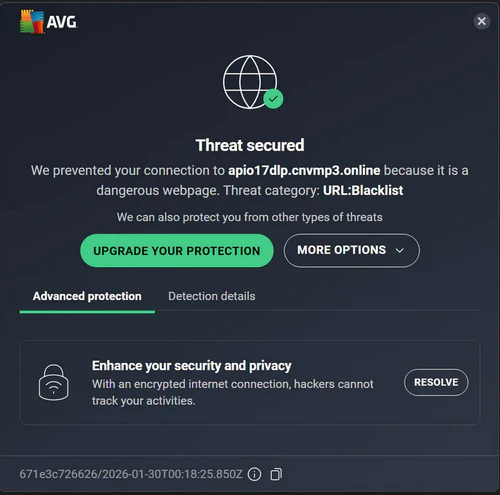
Some users reported that they received warnings from AVG Online Security or Norton Safe Web when clicking Convert. During my test, I did not consistently receive these warnings, which suggests that they might be triggered when downloading specific videos rather than by a confirmed malware download.
This does not mean CnvMP3 is completely dangerous, but it also should not be ignored. When asked if a server upgrade could fix these annoying virus alerts, the reality is complex. While moving to a high-reputation IP and upgrading to Grade A SSL encryption can reduce 'Unsafe Connection' flags, it won't stop heuristic scanners from flagging the conversion process itself.
Just make sure you are using the right site (https://cnvmp3.com/), and bookmark it so you don't forget.
Be cautious about the fake copies of CnvMP3, like .org, as they may contain ads, redirects, or unsafe downloads, and also the first thing that comes up after searching "cnvmp3".
Use Incognito Mode if necessary. If CnvMP3 blocks frequent conversions or behaves differently after several downloads, opening it in an Incognito window may help. However, it does not protect you from unsafe downloads or malicious redirects, so always verify the exact URL and avoid any unexpected downloads and redirects.
To evaluate whether CnvMP3 is a reliable online YouTube converter, I ran several real conversion tests with different videos of different durations.
To get a 360-degree view of CnvMP3's reliability, I selected 20+ target URLs divided into four major categories. To maintain a level playing field across all 20 samples, I locked in the following output settings for every trial: MP4 (Fixed at 1080p Full HD where available).
| Item | Average Speed | Best Case | Worst Case | Success Rate |
| Quick Hits (~5m) | 81s | 15s | 210s | 100% |
| Standard Features (~30m) | 3m | 1m | 8m | 90% |
| Deep Dives (~1h) | 5.6m | 2m | 13m | 70% |
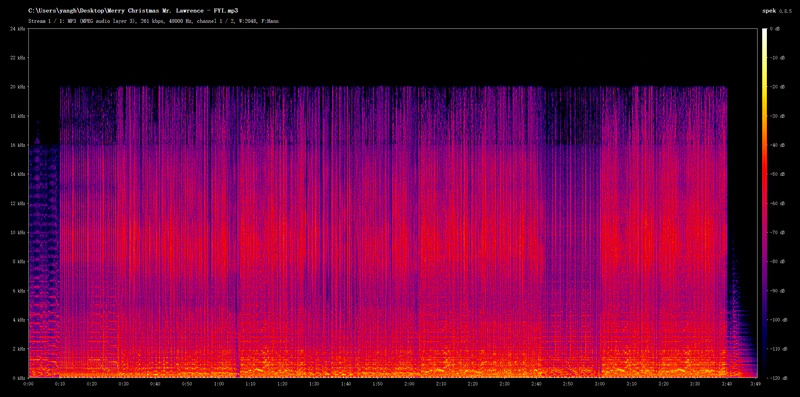
To check if the "320 kbps" claim is genuine or merely an upscaled fake, I selected a music video and downloaded it as a 320 kbps MP3 with CnvMP3.
Although the output file's metadata indicated 256 kbps, the spectrogram revealed the truth. Transcoding stripped all high-frequency details above 16kHz, such as cymbal decay and "airiness", leaving the audio quality on par with a standard 128 kbps file.
The bottleneck is the source itself. Since YouTube's native audio stream is typically capped at around 128 - 160kbps (Opus/AAC), no matter what bitrate you select on CnvMP3 or similar converters, you cannot "create" data that isn't there. You are simply putting 128kbps audio into a larger 320 kbps container.
The answer is no. Most web-based converters shy away from playlists and bulk downloads. The technical reality is that batch processing requires exponentially higher CPU and RAM resources, not to mention the massive outbound bandwidth needed to handle dozens of simultaneous streams.
While CnvMP3 excels at short clips, it glitches when handling videos longer than the 1-hour mark, like sluggish speeds or conversion failures. This might be caused by server instability, but it means reliability drops as file size increases.
The conclusion is that CnvMP3 is not ideal for long videos. It has clear limits for long videos. MP3 conversions failed when the video was longer than about 1.5 hours, while MP4 conversions failed when the video was longer than about 1 hour.

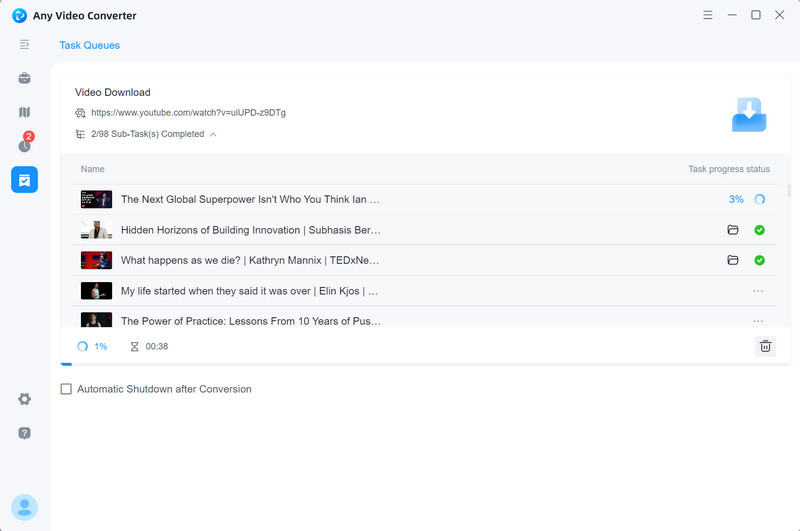
If you need to archive an entire channel or playlist, stop fighting with browser limitations. The most efficient workaround is Any Video Converter. This desktop powerhouse allows you to paste a single playlist URL and download the entire collection, or select specific tracks to download.
Based on my hands-on safety and performance test with user feedback from Reddit, I have compiled a guide to the most frequent questions with CnvMP3 and how to resolve them.
CnvMP3 itself hasn't blocked you. Access denied or IP blocks are usually the result of geofencing or local censorship. If switching the VPN node or IP address does not work, it may indicate that the site's own servers are being rate-limited by YouTube in that specific region. In this case, you can switch to another site or use the desktop software.
This is a frequent headache that usually happens when using an online YouTube converter. This is caused by YouTube's DASH (Dynamic Adaptive Streaming over HTTP) protocol, which serves high-definition video and high-bitrate audio as separate streams. Most web-based tools simply fail to sync them due to the server.
When attempting to download a video longer than 1-hour as an MP4 in 1080p, you may encounter an endless converting loop or a sudden download error message.
This happens because high-res, long-form videos require intensive server-side transcoding, which often exceeds the capacity of a free web tool. While you can refresh the page and restart the process, or lower the resolution to 720p or 360p.
During my tests, I noticed that CnvMP3 occasionally 'hallucinates' and downloads the wrong songs. This is often caused by a parsing error in the site's indexing engine, especially for videos with generic titles.
What I do is lower the bitrates to trigger a re-indexing of the video. This forces the tool to fetch a new stream from YouTube's servers. If you still get the wrong song after a few attempts, it's a clear sign of a script failure. It is better to switch to other YouTube to MP3 sites or dedicated MP3 downloaders to get the correct songs.
If you find that CnvMP3 is not enough for your YouTube to MP3 or MP4 conversions, use the options below to choose an alternative.
Best for Batch Downloads, Playlist Downloads, and Long Videos
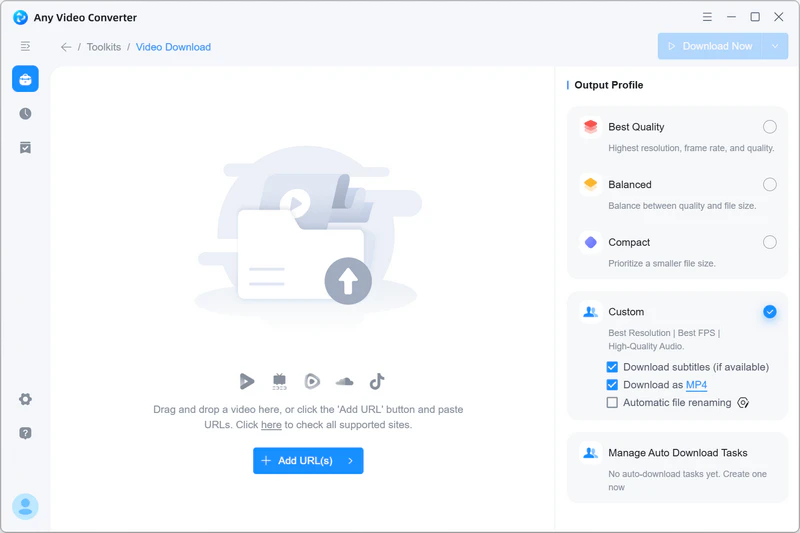
If CnvMP3 is not enough for your daily download needs, Any Video Converter is a more practical desktop alternative for frequent downloads, long-form videos, playlists, and multi-URL tasks. Compared with a browser-based YouTube converter, it gives you more control over formats, quality, file names, and download management.
More sites supported. Download videos and audio from 1,000+ websites.
Built-in browser. Sign in to supported sites to download private, age-restricted, or members-only content.
More output formats. Save downloads as MP4, MKV, MP3, WAV, FLAC, and more.
Better for long-form videos. It is ideal for long videos compared to online converters with strict duration limits.
Playlist and batch downloads. Parse playlists and download multiple URLs in batches.
Advanced download controls. Save custom presets, rename files automatically, and auto-download.
Best for Occasional YouTube to MP3/MP4 Conversions
If you only need an online converter similar to CnvMP3, you can choose one from the comparison table below. The listed sites passed my latest basic checks for conversion availability, ads, redirects, and downloaded file types at the time of testing.
| Alternatives to CnvMP3 | Best for | Safety Test Summary | Main Limitation |
| OGMP3 | YouTube to MP3 with trim | No ads, pop-ups, or redirects observed | Slow download speed |
| YouTube Multi Downloader | YouTube playlist parsing | No ads, pop-ups, or redirects observed | No batch downloads |
| Loader.to | Download YouTube videos in 4K | Ads and redirects observed | Slow download speed |
| OnlyMP3 | Convert long YouTube videos to MP3 | No ads, pop-ups, or redirects observed | Lower audio quality (116 to 129 kbps) |
Based on my testing, CnvMP3 has been proven to be a relatively safe and reliable tool for converting YouTube to MP3. It is suitable for casual users who occasionally download short clips (less than 1 hour) from YouTube and other sites.
If you are dealing with long-form videos where CnvMP3 hits a wall, Any Video Converter is your best bet. It picks up where web tools leave off, allowing you to download massive files and full playlists to MP4 or MP3 without restrictions.

Charlie Campbell is an experienced technical documentation writer with a background in software development and a passion for emerging AI technologies. Dedicated to helping readers stay ahead in the fast-paced digital landscape, he combines technical expertise with clear communication to simplify complex topics and keep audiences informed on the latest advancements.